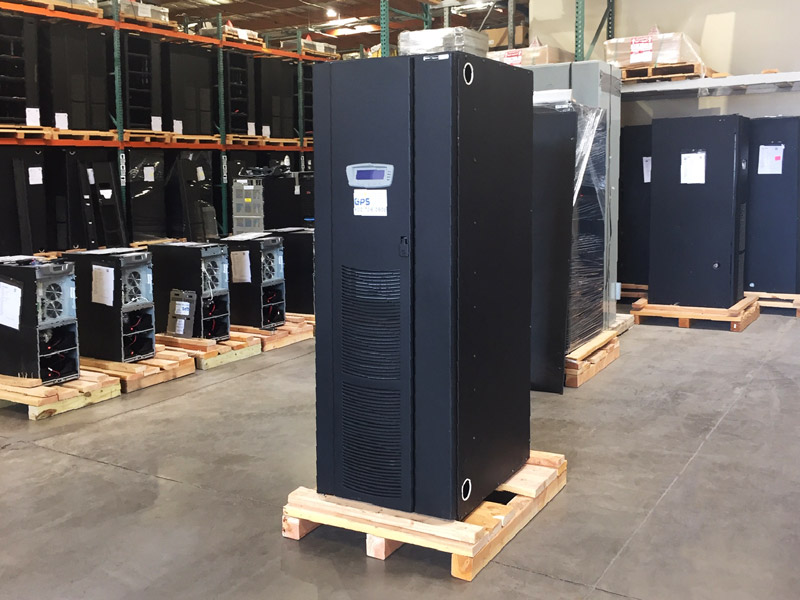
Replacing a facility UPS system is more than exchanging one piece of equipment for another. A successful UPS replacement project needs to account for the protected load, required capacity, battery runtime, redundancy, electrical configuration, physical installation and how critical equipment will remain supported while the transition takes place.
It is also an opportunity to determine whether the UPS configuration that supported the facility in the past is still the right configuration for its current and planned power requirements.
CI Group supplies UPS systems across a wide range of capacities and manufacturers and offers UPS rental equipment for temporary critical-power requirements during replacement, maintenance and infrastructure upgrades.

Start With Why the UPS Is Being Replaced
The first step is understanding what the replacement project needs to accomplish.
A facility may be considering UPS replacement because:
- The existing UPS no longer provides the required capacity
- Additional facility or IT loads are planned
- The current redundancy strategy is changing
- Major UPS components require lifecycle attention
- Manufacturer or parts support is becoming limited
- The existing electrical configuration no longer fits the facility
- The facility is undergoing a larger electrical or data center upgrade
- A different UPS configuration would better support current operations
Identifying the reason for replacement helps establish the specifications for the new system instead of simply replacing the existing UPS with another unit of similar capacity.
Evaluate the Current and Planned UPS Load
One of the most important parts of a UPS system replacement is determining how much load the new system actually needs to support.
Review both current and planned requirements, including:
- Current connected UPS load
- Peak operating load
- Equipment being added or removed
- Future expansion plans
- Redundancy requirements
- Required battery runtime
- Expected changes in IT or facility infrastructure
The goal is to select a UPS configuration that provides the required capacity today while allowing appropriate room for redundancy and planned growth.
This is especially important for data centers adding higher-density computing. Facilities planning AI or GPU expansion should also review Power Infrastructure Requirements for AI Data Centers.
Don’t Assume the Existing UPS Size Is the Correct Replacement Size
The nameplate capacity of the existing UPS provides useful information, but it should not automatically determine the capacity of the replacement system.
The existing UPS may have been selected for a very different load profile. The facility may now be using substantially less or more of its available capacity, or future expansion may require additional room for growth.
Before equipment is selected, evaluate:
- Actual connected load
- Desired operating margin
- Redundancy configuration
- Future capacity requirements
- UPS efficiency characteristics at the expected load
- Battery and runtime requirements
For larger installations, the engineering team should determine the required UPS capacity and redundancy architecture before specific replacement equipment is purchased.
Review the Existing Electrical Configuration
A UPS with the correct kVA rating can still be poorly matched to the project if its electrical configuration does not fit the facility.
Confirm requirements such as:
- Input voltage
- Output voltage
- Phase
- Frequency
- Input and output breaker requirements
- Existing bypass configuration
- Maintenance bypass arrangement
- Distribution equipment
- Grounding configuration
- Available fault-current requirements
- Generator compatibility
- Monitoring and communications
The replacement UPS should be evaluated as part of the existing electrical system rather than as an isolated piece of equipment.
Evaluate the Battery System at the Same Time
A UPS replacement project should include a review of the battery system rather than automatically assuming the existing batteries will remain in service.
Consider:
- Battery chemistry
- Battery age and condition
- Number of battery strings
- Battery cabinet or rack configuration
- Required runtime
- Compatibility with the replacement UPS
- Battery monitoring
- Available room for additional battery capacity
Changes in UPS load can also change available battery runtime.
CI Group’s UPS Battery Runtime Calculator can provide a planning estimate based on battery configuration and UPS load.
When batteries need to be replaced as part of the project, CI Group also provides UPS battery replacement services.
Consider Whether Component Replacement or Modernization Is an Option
Not every aging UPS automatically needs to be removed and replaced as a complete system.
Depending on the manufacturer, model, equipment condition and facility requirements, an organization may have several options:
- Continue maintaining the existing UPS
- Replace lifecycle components such as batteries, fans or capacitors
- Modernize supported electronics or controls
- Add capacity to a modular system
- Replace the existing UPS with a newer system
Eaton’s current lifecycle guidance, for example, includes preventative maintenance, component replacement, modernization programs and complete UPS replacement as different options depending on the specific equipment and its lifecycle.
Review Eaton’s UPS modernization guidance.
The appropriate approach should be based on the actual UPS model, condition, support status, facility requirements and planned load.
Check the Physical Space Before Selecting the New UPS
UPS equipment with similar ratings can have different physical dimensions, battery arrangements, ventilation requirements and service-clearance requirements.
Before selecting replacement equipment, confirm:
- UPS room dimensions
- Door and hallway clearances
- Freight-elevator capacity, if applicable
- Rigging and equipment access
- Floor loading
- Required front, rear and side service clearances
- Cooling and ventilation
- Battery cabinet or rack space
- Conduit and cable-entry locations
These considerations can influence which UPS models are practical for an existing facility.
Plan How the Critical Load Will Be Supported During Replacement
The existing UPS cannot always remain in service throughout a replacement project.
The transition plan needs to establish how protected equipment will be supported while the existing system is disconnected, removed and replaced.
Depending on the facility design, options may include:
- Existing redundant UPS capacity
- Maintenance bypass arrangements
- Alternate power paths
- Scheduled load transfers
- Temporary UPS equipment
- A planned maintenance window
The appropriate method depends on the electrical architecture and operating requirements of the facility.
Use a UPS Rental When Temporary Capacity Is Needed
A UPS rental can be incorporated into the replacement plan when the facility needs temporary protected power while permanent equipment is being changed.
Rental equipment can be useful during:
- UPS replacement
- Major component replacement
- Infrastructure upgrades
- Facility renovations
- Capacity expansion
- Longer equipment-transition periods
The rental UPS should be planned with the same care as permanent equipment. Capacity, voltage, runtime, electrical connections, placement and transfer sequence all need to match the temporary application.
CI Group offers UPS rental systems across a range of capacities for temporary critical-power requirements.
See When Does a UPS Rental Make Sense? for additional examples.
Coordinate the UPS Replacement With the Generator System
In facilities using standby generation, the replacement UPS also needs to operate appropriately with the generator and the rest of the backup-power system.
The project team should consider:
- Generator capacity
- UPS input characteristics
- Generator voltage and frequency regulation
- Battery recharge requirements
- Automatic transfer-switch operation
- Load sequencing
- Other facility loads supported by the generator
A change in UPS capacity or technology can change the way the UPS interacts with the upstream power system, so generator compatibility should be reviewed as part of the replacement design.
Plan the Removal and Installation Logistics
Large three-phase UPS systems can require significant planning to move into and out of a facility.
Before the replacement begins, establish:
- How the existing UPS will be electrically isolated
- How batteries will be disconnected and handled
- How the old equipment will be removed
- What rigging will be required
- How the replacement UPS will reach the equipment room
- Whether doors or access points require temporary modification
- How existing conduit and cabling will be reused or modified
- Who is responsible for electrical installation
- How removed equipment will be transported or dispositioned
Identifying these requirements early helps equipment selection and project scheduling stay aligned.
Determine What Happens to the Existing UPS
UPS replacement also creates a decision about the equipment being removed.
Depending on its age, manufacturer, capacity, condition and market demand, the existing UPS may be suitable for:
- Resale
- Reuse at another facility
- Component recovery
- Recycling
Evaluating the equipment before the project begins allows its disposition to be incorporated into the removal and logistics plan rather than addressed after the new UPS has already been installed.
Allow Time for Startup and Commissioning
The project is not complete when the replacement UPS is physically installed.
Before the system is placed into normal service, the appropriate startup and commissioning process should confirm that the equipment has been installed and configured according to the project requirements and manufacturer instructions.
Depending on the UPS and facility, this can include:
- Visual inspection
- Verification of electrical connections
- Configuration review
- Input and output checks
- Battery-system verification
- Bypass operation
- Alarm and monitoring verification
- Functional testing
- Load testing where appropriate
- Integration with facility monitoring
Manufacturer startup requirements should also be reviewed because they can affect warranty activation for some equipment.
Update the Maintenance Plan for the New UPS
The new system should enter service with a maintenance plan rather than waiting until the first service requirement occurs.
Eaton’s current UPS lifecycle guidance notes that actual component life can vary based on factors including load, temperature, humidity, dust and other environmental conditions. It recommends planned preventative maintenance and proactive replacement of applicable lifecycle components according to the UPS model and operating conditions.
Review Eaton’s UPS lifecycle and replacement-parts guidance.
CI Group provides UPS preventative maintenance for facilities developing a service plan around newly installed or existing UPS equipment.
UPS System Replacement Checklist
Before selecting and installing a replacement UPS, confirm:
- Why is the existing UPS being replaced?
- What is the current protected load?
- What future load growth is planned?
- What UPS capacity is required?
- What redundancy configuration is required?
- How much battery runtime is needed?
- Will the existing batteries be retained or replaced?
- What input and output voltage are required?
- What bypass configuration is required?
- Will the replacement UPS fit the available space?
- Can the equipment be moved into the UPS room?
- How will the protected load be supported during replacement?
- Is a temporary UPS required?
- Is the replacement UPS compatible with the generator system?
- What installation and rigging work is required?
- What will happen to the existing UPS?
- What startup and commissioning procedures are required?
- What maintenance program will apply to the new system?
Plan the UPS Replacement Around the Facility
A UPS replacement project is an opportunity to evaluate the complete critical-power requirement rather than simply replacing aging equipment with a similar unit.
Reviewing capacity, runtime, redundancy, electrical configuration, physical installation and future growth before equipment is selected can help the facility identify a UPS configuration that better supports its current and planned requirements.
CI Group supplies new, surplus and pre-owned UPS systems across a broad range of capacities and manufacturers and offers temporary UPS rentals for planned replacements and infrastructure projects.
Planning a UPS System Replacement?
Talk with CI Group about your existing UPS, current load, voltage, required capacity and project schedule. We can help identify available UPS systems and temporary rental options that fit the requirements of your replacement project.